Windows 10/11 and x86-64 Linux. Uses the Git you already have, no account needed.
Runs on your machine
No telemetry, no cloud service, no sign-up.
Your Git, not a copy
Drives the Git you installed, with its config and credentials.
Windows and Linux
The same app on both, as an installer or portable file on Windows and an AppImage or .deb on Linux.
Updates when you say so
The installer and the AppImage announce a new version and install it only when you ask.
The small chores, already handled
Adding repositories one at a time, pulling each one before you start, hunting for a file in your editor. BranchDeck does these for you, so the day starts with the work.
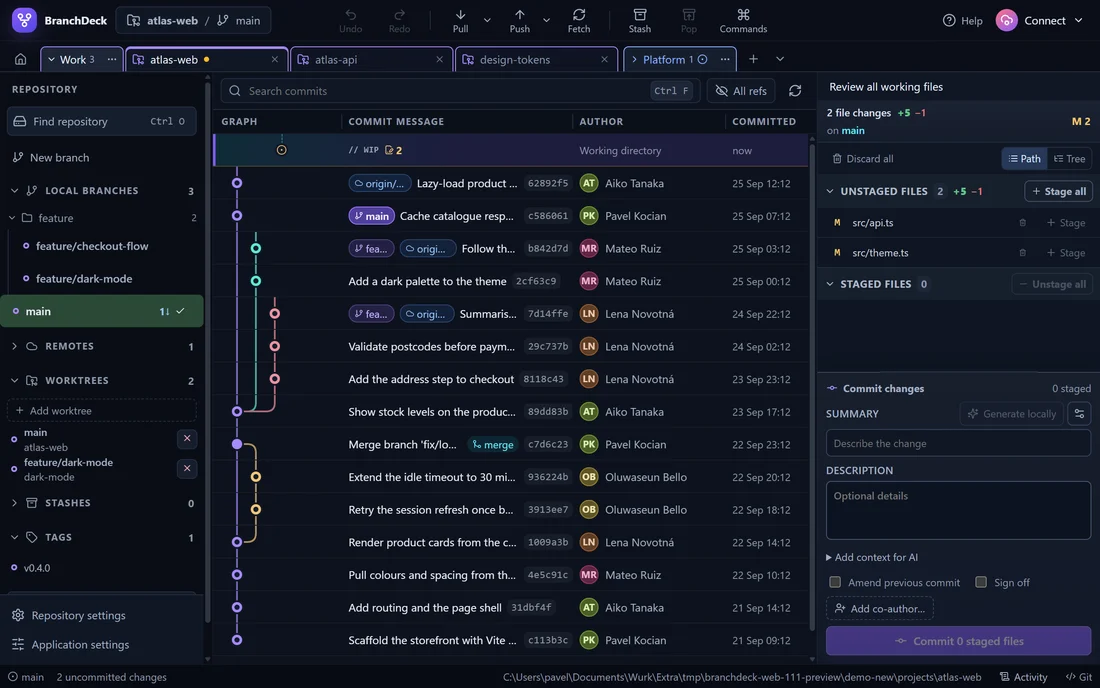
Drag main onto feature/dark-mode, confirm, and the merge is in the graph.Update all on the Work folder: three repositories fast-forwarded, one skipped because its main has uncommitted changes.
Finds your repositories
Point it at the folders where your projects live. Every repository under them appears in the list, and each time you open it, repositories cloned since then show up too. Nothing is added by hand.
Settings › Folders › Watched folders
Updates them all at once
One run fast-forwards the default branch of every saved repository. A branch that has diverged or has uncommitted work is reported and left alone.
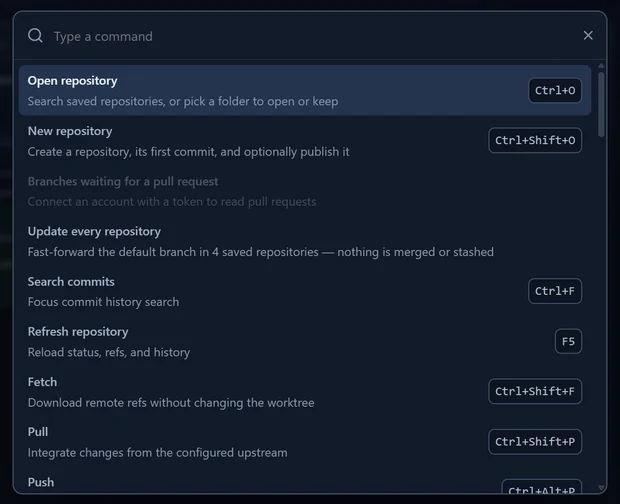
Command palette › Update every repository
Merges by drag and drop
Drag a branch onto another to merge it in. The drop runs the same confirmed merge as the menu, and a drop that would not work says why.
Opens the file in your editor
VS Code, Cursor, Windsurf, the JetBrains IDEs, Visual Studio, Sublime Text, Zed and more, detected on your computer. Each repository remembers the editor you chose for it.
Open in editor
Answers your questions
Ask Help something like “How do I squash commits?”. The answer comes from this computer and can take you straight to the setting it talks about.
Help › Ask BranchDeck
Drafts your commit messages, locally
Tell it why you made the change, and an optional model on your own GPU or CPU drafts the message into the commit box for you to edit. BranchDeck picks a model that fits your graphics card, or runs a GGUF model of your own. No API key, no cloud service, and the diff never leaves your machine.
Settings › Commit messages
The parts of Git that usually need a terminal
Bisect, blame, interactive rebase, patch import and conflict resolution all live next to the graph, and each confirmation tells you what is about to happen.
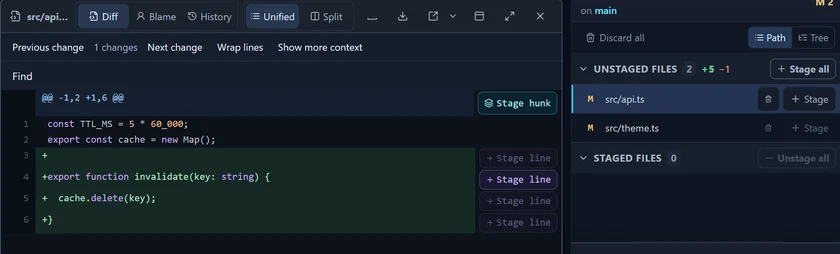
Stage exactly the lines you mean
Open any changed file in unified or side-by-side view and stage the whole file, a single hunk, or individual lines. Word-level marking shows a one-character edit as one character, not a rewritten line.
Drag files between staged and unstaged
Blame and rename-aware file history in the same pane
Syntax highlighting with no network access
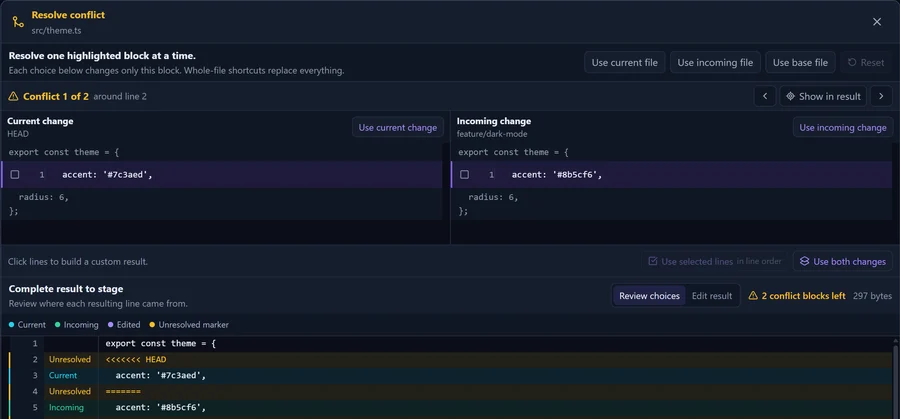
Conflicts, one block at a time
A three-way editor puts the current and incoming change side by side, lets you build a result line by line, and labels where every line in the result came from before you stage it.
Text and binary conflicts, with stale-index protection
Continue, skip or abort a merge, rebase, cherry-pick, revert or am with the command that really finishes it
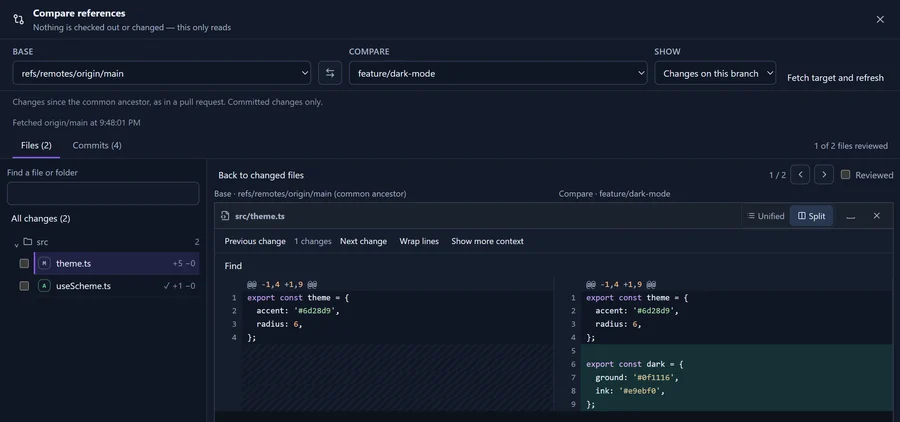
Review a branch the way a pull request shows it
Compare a branch with the remote default branch from their common ancestor, without opening a pull request or checking anything out. Folders on the left, the diff beside them, and a Reviewed tick on every file so you know where you stopped.
Split view keeps line numbers in place while only the code scrolls sideways
Scroll through every changed file, or only the ones you tick, with hunk navigation
Give every project its own place
Organise repository tabs into named groups. Keep related repositories together, collapse a group when you switch focus, and reopen a saved group when you need it again.
Move tabs through their menu or drag them between groups
Names, colours and collapsed groups return after a restart
Linked worktrees have their own section in the repository sidebar
See what you saved in a stash
Open a stash to review its files and changes before bringing them back into your working tree. Switch between unified and split diffs as you inspect each file.
Apply and keep the stash, or pop it when you are ready
BranchDeck checks the stash still matches the one you reviewed
Keyboard first
The command palette reaches the everyday operations, and the shortcut editor checks for conflicts before it saves. Commit search runs in Git across every ref, so it also finds commit bodies, authors and branches the current view hides.
Many repositories in tabs that come back after a restart
Zoom the whole window from the keyboard, and set the code size on its own
Ask in your own words
Type the problem the way you would say it. Help finds the closest answer, lists the steps, and offers the action itself, or the exact setting it talks about. The answers ship with the app, so nothing you ask leaves your computer.
One button from the answer to the dialog that does it
Matching commands and settings listed under the answers
Works with your AI agent
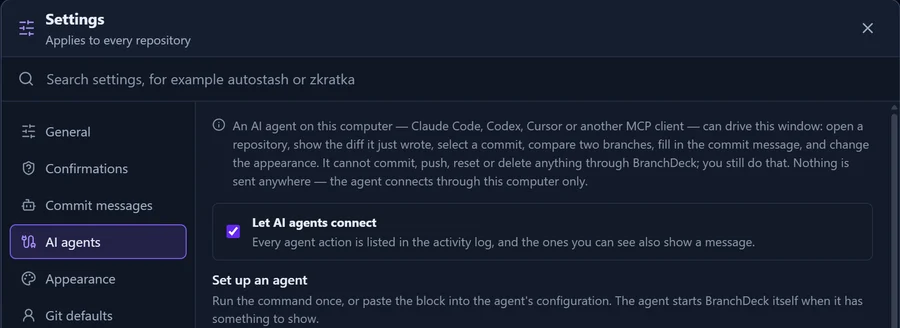
Switch on Settings › AI agents and Claude Code, Codex, Cursor or any other MCP client can use the window you are looking at. The settings show the exact command or configuration to paste into each agent.
The connection runs through a local pipe or socket with a random name, guarded by a key kept in your user profile. No network port is opened.
An agent can
Open a repository, show the diff of a file it just changed, select a commit, compare two branches and fill in a commit message for you to review.
An agent cannot
Commit, push, reset or delete anything through BranchDeck. Every agent action appears in the activity log.
Also in BranchDeck
git log --graph
A graph that scalesPaginated, virtualized multi-lane history in topological order. Every branch, remote branch and tag is labelled on its commit's row.
git rebase -i
The full branch lifecycleMerge, rebase, cherry-pick, revert and reset, plus an interactive rebase editor for reordering, squashing and dropping commits.
git reflog
Undo and redoTake back staging, a commit, a checkout or a new branch, with the exact index state restored. Reflog recovery is there for the rest.
Activity
See what Git saidThe activity log keeps what every Git operation printed in this session, and the full command line when one fails.
git bisect
InvestigationBisect from the app with Good, Bad and Skip buttons, blame that ignores reindentation, and a two-way comparison of any two refs.
git init
New repositories, publishedOne dialog creates the folder, the first commit, ignore templates and a licence, and can create the repository on your host and push it.
git log -L
History down to a lineBrowse the tree at any revision and follow the history of a path, a piece of text or a range of lines. Image changes compare side by side, with a pixel difference.
git stash
Stashes you can manageStash only the files you pick, rename or export a stash, open a preview of it, and show stashes in the graph.
Built to make mistakes hard
Every risky operation is confirmed by default. You can switch any confirmation off, and the ones that cannot be undone stay clearly marked.
Works with your host
GitHub and GitHub Enterprise, GitLab, Bitbucket Cloud, Azure DevOps and Gitea. Clone, push, create repositories and open pull requests on each of them. On Azure DevOps you also get voting, completion and policy override.
Connect several accounts on the same service, and each remote uses the account that matches its host. None of this is required: local work, and cloning with the Git credentials you already have, needs no account at all.
Force push
Force push looks dangerousIt always uses --force-with-lease, turns the Push button red, asks every time, and resets to a normal push after a restart.
Hard reset
Hard reset is its own choiceIt has a separate confirmation because, unlike most operations, no reflog brings the discarded work back.
Publishing
Failures stay where you can see themIf a repository is created but the push is refused, the remote stays wired up and you are offered a retry. BranchDeck never forces over the remote for you.
Credentials
Credentials stay out of the UIGit and tokens never enter the renderer. A credential goes to one child process, only for a host that matches the account.
Get BranchDeck 1.1.1
All downloads come straight from the official GitHub release, each with a SHA-256 checksum. Starting with 1.1.1, BranchDeck is free for personal and business use under its end-user licence.
InstallerRecommended
Installs for your user only, with no admin rights, and updates itself. 107 MBInstaller
Portable
One file that runs from anywhere. You replace it by hand. 93 MBPortable
Linux
x86-64 desktop distribution, with git from your package manager
AppImageRecommended
Runs from one file and updates itself. Needs FUSE 2. 145 MBAppImage
Debian / Ubuntu
Installed and updated by your package manager. 113 MB.deb
“Windows protected your PC”BranchDeck is not code-signed yet, so Windows does not recognise the publisher the first time. Click More info and then Run anyway. Only accept a build from the official release page.
Check the downloadCompute the hash and compare it with the .sha256 file published next to the download:
Get-FileHash .\BranchDeck-*-setup.exe
sha256sum -c BranchDeck-*.AppImage.sha256
Open-source componentsBranchDeck is built on Electron, which includes Chromium and FFmpeg under the LGPL-2.1-or-later. Their corresponding source (1561 MB), with patches and rebuild instructions, is published with every release.
Something broke?Choose Help → Copy diagnostics and email the report to [email protected]. It contains version numbers, not tokens, account names or paths.
Support BranchDeck
I started BranchDeck to make my own day-to-day work with Git easier. If it helps you too, you can support its development with a one-time or monthly tip.
 BranchDeck